Mobile Gaming and App Setup at Prive Casino UK
Updated November 2026
Licensed
 Available in GB
Fast payouts
18+ Only
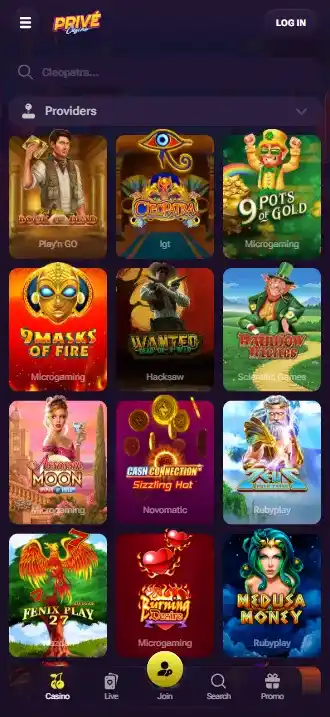
Prive Casino works in a mobile browser, so UK users can access the casino from a phone without a required download. The mobile experience covers the same broad service areas readers care about most: casino games, live casino, account access and support through live chat. A native iOS or Android app is a separate question and should not be inferred from the existence of a responsive website. Unless an official app-store listing or current brand source confirms a native app, the safe description is browser-based mobile play. For most users, that distinction matters less than whether the site is usable for navigation, payments and account checks on a small screen.
Table of Contents
- Prive Casino Mobile Browser Performance and Device Compatibility
- Is there a Prive Casino app?
- Game discovery on a phone
- Live casino on mobile
- Account access and KYC on a small screen
- Payments on mobile
- Live chat from a phone
- Browser play vs a native app
- Mobile security basics
- What can feel slower on mobile
- A practical mobile checklist
- Who is the mobile browser best for?
- Sports betting on mobile
- What mobile users can expect
- FAQ
Prive Casino Mobile Browser Performance and Device Compatibility
Prive Casino supports play through a mobile browser. That means you can visit the UK-facing site from a phone, log in and use the service without first installing dedicated casino software. Browser access is often the simplest route because it keeps the account tied to the same website used on desktop. For a mobile review, the important test is not whether the site looks like an app. It is whether core tasks remain reachable on a smaller display. Those tasks include finding games, opening live casino, reaching account controls, using the cashier and contacting support. A responsive browser experience can handle all of those without a native download. For the broader overview, see Prive Casino UK Review.Is there a Prive Casino app?
A native iOS or Android app should be treated as confirmed only when an official app-store or brand source supports it. Third-party phrases such as “casino app” are not enough because review sites often use the word app loosely for a mobile website, shortcut or progressive web experience. That distinction protects users from downloading unofficial software. If you want a native app, verify the developer name, store listing and destination before installing anything. If no official listing is visible, the mobile website remains available without the need to sideload files from an unknown source.Game discovery on a phone
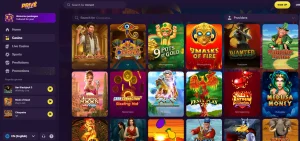
Prive has a large casino catalogue, and the broader Prive Casino Games guide covers the range in detail. On mobile, the practical issue is discovery: a catalogue that is easy to browse on a wide monitor can feel crowded on a narrow screen. Use category filters and search where available instead of scrolling through long rows of tiles. Open one game at a time and let the browser finish loading before switching sections, especially on a weaker mobile connection. If a game is resource-heavy, landscape orientation can give the interface more room, although the best orientation depends on the title itself. The mobile review should not promise identical performance for every game. Individual titles come from different providers and can have different graphics, loading behaviour and controls.Live casino on mobile
A live casino section is available at Prive, so browser-based users can access live-dealer content from a phone. The dedicated Prive Casino Live Casino page covers the category itself, including roulette, blackjack and baccarat. On mobile, the more useful question is how the live interface fits a small screen. Live games combine streamed video with betting controls, tables and chat or interface elements. A stable connection matters more here than for a simple slot. Rotating the phone, reducing other network activity and keeping the browser updated can help, but flawless streaming cannot be assumed on every device or network.Account access and KYC on a small screen
Account management is available through the browser, but identity verification can be more awkward on a phone than ordinary browsing. KYC is part of Prive’s account and withdrawal controls, and mobile users may need to photograph or upload information during the account process. Before submitting anything, make sure the image is readable, the whole requested document area is visible and the connection is secure. Do not send identity documents through a random message or unofficial contact channel. Follow the prompts inside the account or the official support route. The Prive Casino Registration and KYC guide handles account setup in more detail. The focus here is how those tasks translate to a phone.Payments on mobile
Using the cashier on a phone is convenient, but small screens increase the chance of overlooking a currency label, amount or payment detail. Prive supports cards, e-wallets and cryptocurrencies, so the payment process can differ substantially depending on the method. For cards and e-wallets, check the account and transaction currency before confirming. For crypto, copy wallet details carefully and verify the selected asset and any network instruction shown by the cashier. A mobile browser should make those steps possible, but convenience is not a reason to rush a financial confirmation. Exact withdrawal limits and processing times belong on the payment pages, not in a general mobile review. If cashout behaviour is your main concern, use the Prive Casino withdrawals guide.Live chat from a phone
Live chat is available at Prive Casino, which is particularly useful on mobile because it provides a support route without requiring a separate phone call. If a game, account screen or payment step is unclear, chat can help you ask a targeted question while the relevant page is still open. Do not paste full payment credentials, passwords or identity-document data into chat. Support should help explain process and status, but sensitive information should be submitted only through the secure process the operator instructs you to use.Browser play vs a native app
| Mobile route | What is verified | Practical implication |
|---|---|---|
| Mobile browser | Verified | No required download; use the UK-facing site in a modern browser. |
| Native iOS app | Not claimed here without official verification | Do not infer one from third-party “app” wording. |
| Native Android app | Not claimed here without official verification | Avoid sideloading unknown APK files. |
Mobile security basics
Casino use combines account credentials, personal information and financial activity, so mobile security deserves the same attention as desktop security. Use a device lock, keep the operating system and browser updated, and avoid logging in through links from unsolicited messages. Prefer a trusted private connection for payments or identity checks. Public Wi-Fi can be convenient for browsing, but it is a poor place to handle sensitive account tasks. Also check the address bar before entering credentials, especially if you reached the site from a search result or message. These are general device-safety practices rather than claims about a special Prive security feature. They reduce common user-side risks regardless of the casino.What can feel slower on mobile
Mobile friction often comes from the device and connection rather than the casino account itself. Live video uses more bandwidth than ordinary pages. Large game assets can take longer to load. Uploading identity images can be slower on weak connections. Payment providers can also open external confirmation pages or banking apps. If a page hangs, avoid repeatedly submitting the same payment or form. Check whether the first action completed before trying again. Duplicate actions create more confusion than waiting a moment and reviewing the account status.A practical mobile checklist
- Use the verified browser route rather than assuming you need an app.
- Bookmark the correct site instead of relying on repeated search clicks.
- Keep the browser and operating system current.
- Use search and filters to navigate the large game catalogue.
- Give live casino a stable connection and enough screen space.
- Check amounts and currency carefully in the cashier.
- Use official account prompts for KYC uploads.
- Contact live chat for process questions without sharing passwords or full payment credentials.